An RPC function is a typed server function you call directly from the
browser. You write an ordinary function, put the @rpc build tag on it, and the
build tooling takes care of the wire hookup. There is no fetch, no endpoint and
no client to write, and every call is type checked at build time.
Make a function an RPC function with @rpc
A build tag is a tag in a comment that tells the Elements build how to treat
the declaration below it. To make a function an RPC function, put a JSDoc
comment containing the @rpc build tag directly above it:
app/pages/signup/services.tsimport { sql, ValidationError } from "@elements/app";

/** @rpc */
export function createUser(form: UserForm): User {
  if (!form.email.includes("@")) {
    throw new ValidationError({ email: "Enter a real email address." });
  }

  return sql<User>(`
    insert into users (
      name,
      email
    ) values (
      ${form.name},
      ${form.email}
    )
    returning *
  `).firstOrThrow("insert returned no row");
}
Then call it from a template like any other function:
app/pages/signup/template.ehtml<form onsubmit={() => user = createUser(form)}>
  <input value={form.name} />
  <input value={form.email} />
  <button type="submit">Sign up</button>
</form>
The function runs on the server, and its result comes back to the page. The
call needs no await: the build adds it. The function's body, and everything
it uses, never reaches the browser.
Type checked at build time
Every call to an RPC function is type checked at build time, like any other function call: the arguments against its parameters, and its result against how your code uses it. A mismatch is a build error at the line of the call, so it is fixed before your app ever runs.
RPC functions are type checked:
app/shared/services/chat.ts/** @rpc */
export function rateMessage(stars: number) {
  // save the rating
}
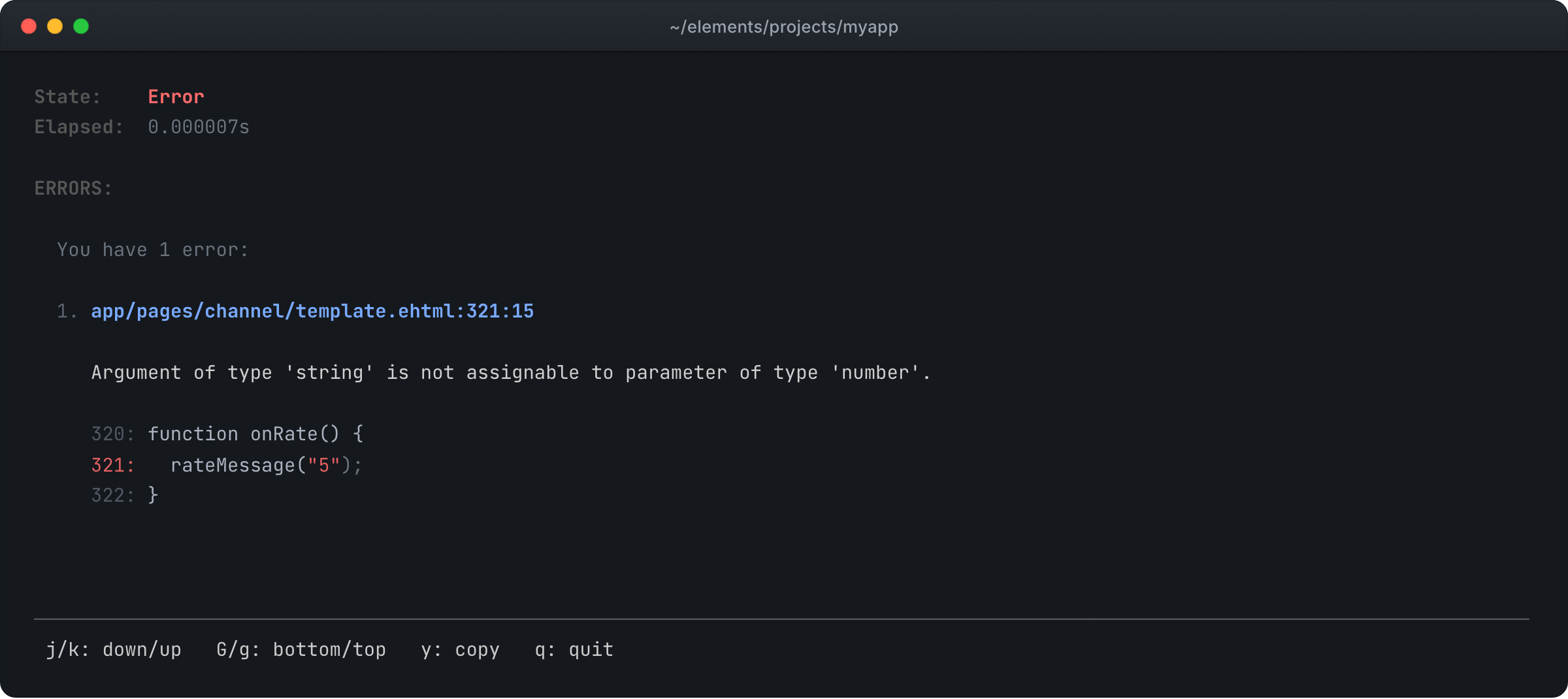
The function takes a number and the page passes a string, so the build reports a type error on that line.
Complex types cross the wire
An RPC function's arguments and its result travel through Elements JSON, or EJSON, the serializer Elements uses wherever data crosses between the server and the browser. It is valid JSON, and it carries what plain JSON drops:
- Your classes, as your classes. Mark a class
@jsonand an instance that leaves the server arrives in the browser as the same class, methods and all. - Built-in types, as themselves. A
Datestays aDate, andMap,Set,Fileand query results keep their types. - Shared and circular references. An object used in two places arrives as one object, and objects that refer to each other arrive intact.
- Files. A form object with
Filefields goes up in the same call as the rest of the form.
app/pages/invoice/services.tsjson export class Invoice { constructor(public id = "", public total = 0, public dueAt = new Date()) {} overdue() { return this.dueAt < new Date(); } } /** @rpc */ export function loadInvoice(id: string): Invoice { // read the invoice from the database }
app/pages/invoice/template.ehtmllet invoice = loadInvoice(id);

invoice.overdue();   // a real Invoice, with its methods, in the browser
Live views and channel listeners
An RPC function can return a LiveTable view or a channel listener, and EJSON carries it across live. The browser receives it already subscribed, and its updates keep arriving after the call returns:
app/pages/room/services.ts/** @rpc */
export function openRoom(roomId: string) {
  session.isLoggedInOrThrow();

  if (!isMember(roomId, session.getOrThrow("userId"))) {
    throw new ForbiddenError();
  }

  return roomMessages.view({ roomId });
}
That is how a page opens a chat room only after the server checks that the visitor belongs in it. The same serializer carries the data a route hands its page, the messages a channel sends and every LiveTable update, so a value looks the same wherever it travels.
session works in every RPC function
Session context is available inside every RPC function. session.login signs
a user in and stores the data you give it on their session, such as their user
id. Retrieve session data values with session.get or session.getOrThrow,
and sign the user out with session.logout:
app/pages/signin/services.ts/** @rpc */
export function signin(email: string, password: string) {
  let user = findUser(email, password);

  if (!user) {
    throw new AuthError("Wrong email or password.");
  }

  session.login({ userId: user.id });
}

/** @rpc */
export function myInvoices(): Invoice[] {
  let userId = session.getOrThrow("userId");

  return listInvoices(userId);
}
Any page that reads the session updates the moment it changes, so signing in from an RPC function flips the page to its signed-in state without a reload.
Secure by construction
RPC functions are how your app moves data between the browser and the server, so the security is built into them rather than left to you.
Server code can only be reached through an RPC function
sql(), transactions, sign-in, email and your secrets only run on the server.
The browser build leaves them out, so they are never in the code the browser
downloads. Use one from code the browser runs and the build goes red at that
line, so a query or a secret cannot reach the browser by accident. An @rpc
function is the one way across: inside it, and in everything it calls, server
code just works.
Server code cannot be called from the browser:
app/pages/channel/template.ehtml<button onclick={() => sql(`delete from messages`)}>Clear channel</button>
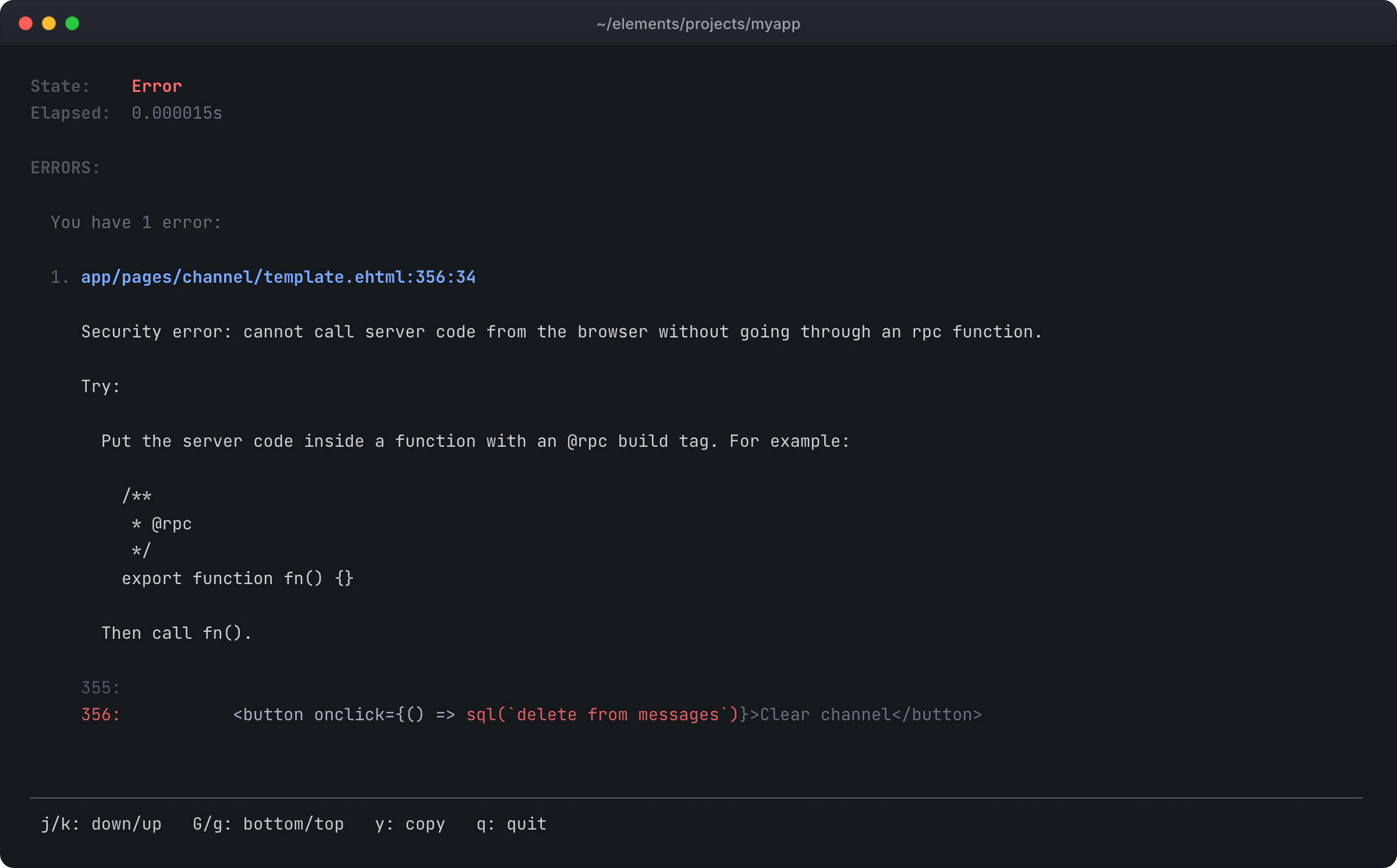
The button runs in the browser and sql() only runs on the server, so this is
a build error, and the error shows how to fix it: move the query into an RPC
function and call that instead.
Only RPC functions can be called from the browser
The browser can call the functions you marked @rpc, and no other function in
your app. A call sends only data: the arguments arrive as values of the types
you declared, and nothing the browser sends is ever run as code. Errors your
code did not mean to show reach the browser as a generic error, so stack traces
and internal messages stay on the server.
Authorization at the top of the function
Inside an RPC function, session is the server's record of who is signed in,
from their session, never from anything the caller sent. A caller cannot change
who they are by what they pass in. So authorization is plain code at the top of
the function: check who is asking, then do the work.
app/pages/admin/services.ts/** @rpc */
export function deleteChannel(id: string) {
  session.isLoggedInOrThrow();

  if (!isAdmin(session.getOrThrow("userId"))) {
    throw new ForbiddenError();
  }

  sql(`
    delete from channels
    where id = ${id}
  `);
}
session.isLoggedInOrThrow() turns away anyone who is not signed in, and
ForbiddenError turns away anyone without permission. The page receives each as
the same error class, ready to handle.
Errors the page can show
Throw a ValidationError and its message reaches the browser, either one
message or one per field, ready to show next to the input it belongs to. The
browser catches the same error class you threw, in an ordinary try and
catch. Anything else that goes wrong reaches the browser as a generic error,
so internal details stay on the server.
Send the visitor somewhere else
redirect(url) works inside an RPC function. Everything the function wrote is
saved before the browser moves on, so a sign-up that redirects to the home page
never loses the account it just created.
See RPC functions in a demo
- Applyfold (opens in a new tab), applicant tracking: a résumé PDF and the form around it go up in one call.
- Thriftledger (opens in a new tab), household budgets with bank CSV import.
The manual: rpc (opens in a new tab), async (opens in a new tab), json (opens in a new tab), livetable (opens in a new tab), channel (opens in a new tab), session (opens in a new tab), router (opens in a new tab).