Every Elements app has a Postgres database from the moment it is created. There is nothing to install, nothing to start and no connection string to paste.
Postgres, already running
Elements runs one Postgres server on your machine and gives each project two databases: one for the app and one for its tests. It listens on its own port, so it never collides with a Postgres you already have.
Open a SQL prompt on your app's database at any time:
Terminalelements db
Database configuration
The connection settings live in the database section of config.jsoc. A new
app's config reads each value from an environment variable, and falls back to
the Postgres that Elements runs for you:
config.jsocdatabase: {
  name: "my_app",
  host: env("DB_HOST", "127.0.0.1"),
  port: env<number>("DB_PORT", 5433),
  user: env("DB_USER", "postgres"),
  password: env("DB_PASSWORD", ""),
},
In development there is nothing to change. To use a different Postgres, such as
a hosted one in production, set those variables in that environment's file
under config/env/:
config/env/production.envDB_HOST=db-postgresql-nyc3-12345.ondigitalocean.com
DB_PORT=25060
DB_USER=doadmin
DB_PASSWORD=your-password
Elements then connects to that server instead, over an encrypted connection,
with nothing else to configure. production.env is never committed, so the
password stays out of your repository.
Change the schema by saving a file
Terminalelements create migration "add comments table" -tables=comments
That writes a SQL file under app/migrations/ with an id, timestamps and a
trigger that keeps updatedAt current. Add your columns and save:
app/migrations/20260509120000-add-comments-table.migration.sqlcreate table comments (
  id uuid primary key default uuidGenerateV7(),
  text text not null,
  createdAt timestamptz not null default now(),
  updatedAt timestamptz not null default now()
);
The project server applies it to your development database as part of the build. Change the file and save again, and Elements applies the edited migration to the database. On a deployed server a migration runs once and is then frozen, so production only ever moves forward.
Query with sql()
sql() runs a query and returns its rows, typed. Describe a row with an
ordinary TypeScript interface:
app/shared/types/user.tsexport interface User {
  id: string;
  name: string;
  email: string;
  createdAt: Date;
}
Use it as the type argument to sql(), written sql<User>(...), and you get
back strongly typed rows:
app/lib/users.tsimport { sql } from "@elements/app";
import { User } from "#app/shared/types/user";

export function findUser(id: string): User {
  return sql<User>(`
    select *
    from users
    where id = ${id}
  `).firstOrThrow("No such user.");
}

export function recentUsers(): User[] {
  return sql<User>(`
    select *
    from users
    order by createdAt desc
    limit 20
  `).all();
}
sql<User>(...) returns a SqlResult<User>: the rows the query returned, each
a plain object typed as User. A row is data, not a model. It has no methods,
loads nothing lazily and never runs a query behind your back. Read the rows
with:
first()andlast(): one row, orundefinedwhen there are none.firstOrThrow(): one row, or aNotFoundErrorwhen there are none.all(): every row, as an array.lengthandempty(): how many rows came back.map,filter,find,some,forEachandfor...of, as on an array.
You write the interface to match the columns your query selects, and the
compiler checks every use of a row against it, so user.nmae is a build error.
Return a SqlResult from an RPC function and the browser receives a
SqlResult, with its rows and types intact.
Template values in sql() are safe from SQL injection
${value} inside a sql() template looks like string interpolation, but it is
not. The build turns each one into a query parameter, and the value travels to
Postgres separately from the query text. Postgres never reads it as SQL, so
whatever it contains, it can only ever be a value:
app/lib/users.tslet name = "x'; drop table users; --";

let users = sql<User>(`
  select *
  from users
  where name = ${name}
`).all();

// Postgres receives the query "select * from users where name = $1" and,
// separately, the value of name. It finds no user by that name.
This holds for every ${value} in a sql() template, with nothing to escape
and nothing to remember. It applies to the template only: a query string you
build yourself with + and pass to sql() is sent exactly as written, so
always put values in the template.
Wrap writes that belong together in tx(). A tx() inside another one joins
it, and every sql() call inside joins it too, so helpers compose without
passing a connection around.
camelCase in your code, snake_case in the database
Postgres folds unquoted names to lowercase, so database columns are named in
snake_case, like created_at. TypeScript names are camelCase, like
createdAt. Elements converts between the two, so you write camelCase
everywhere: in sql(), in migrations and in LiveTable config.
- Into the database. A name in your SQL with a lowercase letter followed by
an uppercase one is converted:
createdAtbecomescreated_at. One-word names, likeusersorid, are the same either way. - Out of the database. Each column in the result is converted back to
camelCase. In your TypeScript code you read
user.createdAt, neveruser.created_at, the same as every other name in TypeScript. - Left exactly as written. String values, names in double quotes, comments
and
${value}parameters.'createdAt'in single quotes is a value, so it stays'createdAt'.
app/lib/users.tslet user = sql<User>(`
  insert into users (
    name,
    email,
    createdAt
  ) values (
    ${name},
    ${email},
    now()
  )
  returning *
`).firstOrThrow();

user.createdAt;

// Postgres receives the same query with created_at in place of createdAt,
// and $1 and $2 in place of the two values.
Write userId, not userID: both are stored as user_id, which comes back as
userId.
In your code, you always write camelCase. Working in Postgres directly is the
one exception: the shell that elements db opens is plain psql, so there you
write the names as they are stored, such as created_at. A statement you pass
with -sql is converted, so camelCase works there too:
Terminalelements db -sql "select name, createdAt from users order by createdAt desc"
Why SQL and not an ORM
Elements has no ORM. You write SQL, the language your database already speaks.
One query instead of one per row
An ORM hides joins behind properties. Loop over orders reading
order.customer.name, and it runs one query for the orders, then one more for
each order's customer. That is the N+1 query problem, and each further level of
nesting multiplies it again. In SQL you write the join, and one query returns
every row you need:
app/lib/orders.tsinterface OrderRow {
  id: string;
  total: number;
  customerName: string;
}

export function recentOrders(): OrderRow[] {
  return sql<OrderRow>(`
    select
      orders.id,
      orders.total,
      customers.name as customerName
    from orders
    join customers on customers.id = orders.customerId
    where orders.createdAt > now() - interval '7 days'
  `).all();
}
Rows, not object trees
Data in a database is tables and rows. Most screens want flat rows that combine columns from several tables, like the order with its customer's name above. An ORM makes you think in models: load an order, walk to its customer, build a tree of objects, then flatten it again for the page. SQL asks for the rows you want, in the shape you want them, and the type argument names that shape.
One language, and all of Postgres
An ORM is a second query language that turns into SQL. You learn its API, then
debug the SQL it generates, and it covers only part of what Postgres can do.
With sql(), the query you read is the query that runs, and joins, window
functions, common table expressions, returning, JSON columns and full text
search are all there.
Easier for agents
SQL is more expressive than an ORM's API, and AI models write it well, with
decades of documentation and examples behind it. An ORM's API is one more thing
for an agent to get wrong, and the SQL it generates is something the agent never
sees. With sql(), your agent writes the query, reads it and can run it against
your database with elements db -sql to check the result.
SQL cannot be called from the browser
You cannot call sql() or tx() from the browser. The compiler will not allow
it. Browser code can only reach SQL by calling an RPC function. Call sql()
anywhere else in browser code and you get a compiler error.
The code that queries your database exists only on the server. It is never sent to the browser: not the queries, not the table and column names, not the code around them. The browser has the name of the RPC function to call and the result it returns, and nothing else.
Calling sql() from the browser is a compiler error:
app/pages/channel/template.ehtml<button onclick={() => sql(`delete from messages`)}>Clear channel</button>
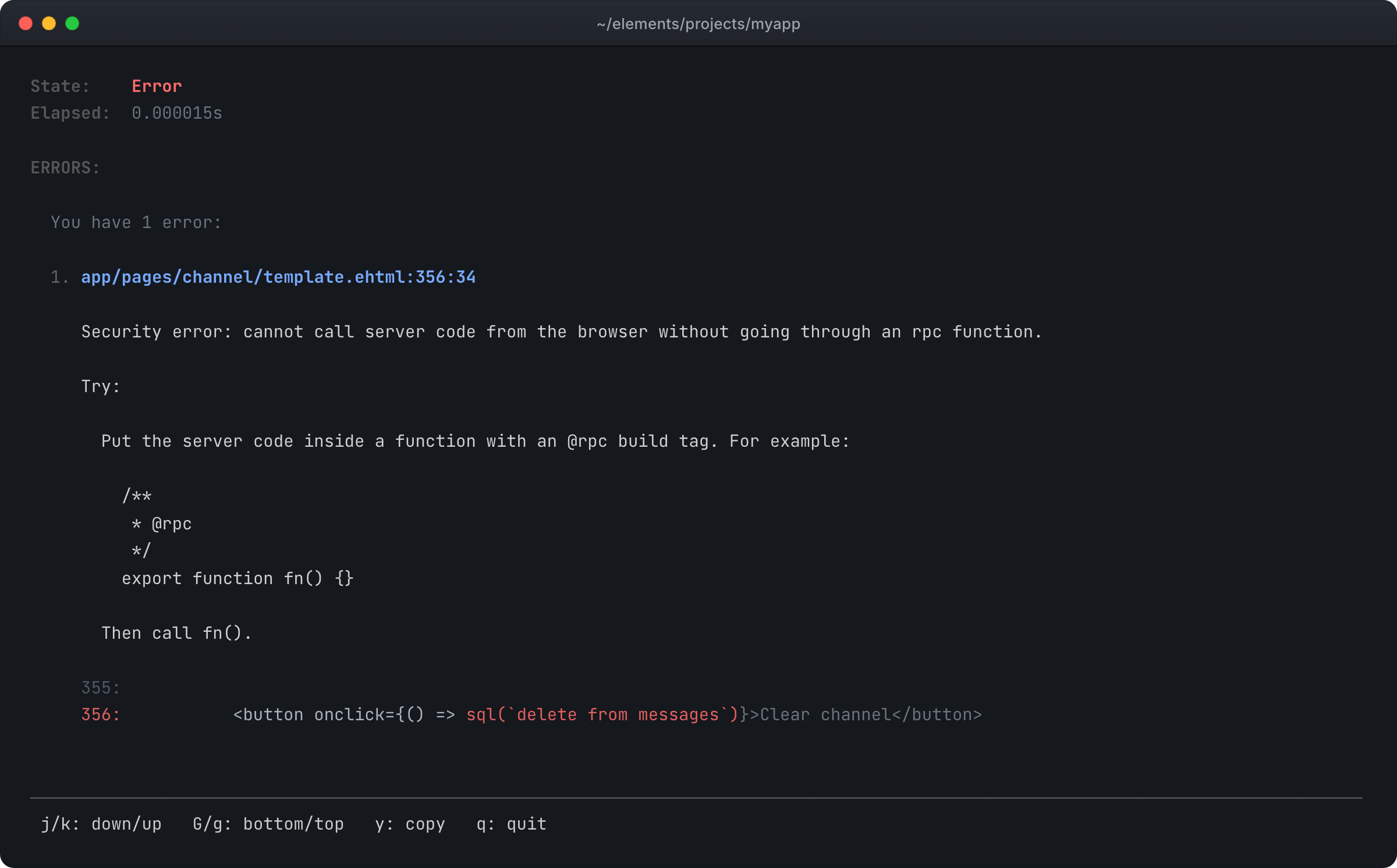
To fix it, move the query into an RPC function and call that function from the browser. The query runs on the server, and the browser only gets the result:
app/pages/channel/services.ts/** @rpc */
export function clearChannel(channelId: string) {
  session.isLoggedInOrThrow();

  if (!isAdmin(session.getOrThrow("userId"))) {
    throw new ForbiddenError();
  }

  sql(`
    delete from messages
    where channelId = ${channelId}
  `);
}
await is added for you
sql() and tx() need no await. For them and the other Elements functions
that support it, the build adds the await and makes every function up the
call stack async.
Requiring await in front of every call is a leaky abstraction. In most
languages you call a function and get its result, and the library handles
concurrency underneath. Elements works the same way: you call sql() and get rows back.
The build still emits a real await, so Node.js runs the I/O concurrently and
nothing blocks while the query runs. When you want queries to run at the same
time, you ask for it with the async variant, below.
A call to another library that returns a promise is different. Mark the
function that makes it async and await that call yourself, as in any
TypeScript. The sql() calls in the same function still need no await.
Propagation stops at a function you marked async. A call to it is left as you
wrote it: it returns a promise, and the function making the call does not
become async. Await it yourself where you want the value.
Run queries at the same time
To run several queries at once, call sqlAsync() directly. It takes the same
arguments as sql(), ${value} is still a query parameter, and it returns the
promise, so you can pass several to Promise.all:
app/lib/dashboard.tsimport { sqlAsync } from "@elements/app";

export async function loadDashboard(userId: string) {
  let [orders, invoices, messages] = await Promise.all([
    sqlAsync<Order>(`
      select *
      from orders
      where userId = ${userId}
    `),
    sqlAsync<Invoice>(`
      select *
      from invoices
      where userId = ${userId}
    `),
    sqlAsync<Message>(`
      select *
      from messages
      where recipientId = ${userId}
    `),
  ]);

  return { orders, invoices, messages };
}
txAsync() is the same for tx(): it returns the transaction's promise. A
transaction has one connection, so queries inside it run one after another,
even in a Promise.all.
See the database in a demo
- Pallethaven (opens in a new tab), inventory and purchase orders.
- Tickwell (opens in a new tab), an issue tracker that keeps the history of every change.
The manual: database (opens in a new tab), migrations (opens in a new tab), async (opens in a new tab).