A page in Elements is a route that gathers data and a template that renders it. The template is real HTML, with typed attributes the route fills in. It arrives in the browser as a complete page, rendered on the server, and from that moment it is reactive: change the data and the page updates itself, down to the one element that changed. One file of HTML does both jobs.
A page is a route and a template
The route reads what the page needs and hands it to the template:
app/pages/channel/index.tsimport { Request, Response, sql } from "@elements/app";
import { Channel } from "./models";
import { messages } from "#app/shared/services/chat";
import html from "./template";

export default function route(req: Request, res: Response) {
  let channel = sql<Channel>(`
    select *
    from channels
    where id = ${req.params.id}
  `).firstOrThrow("no such channel");

  return new html({ channel, messages: messages.view({ channelId: channel.id }) });
}
The template declares what it takes, right on its opening tag, and renders it:
app/pages/channel/template.ehtmlimport { LiveView } from "@elements/app";
import { Channel, Message } from "./models";

function onSend(form: { text: string }, messages: LiveView<Message>) {
  messages.insert({ text: form.text }, () => form.text = "");
}

<html (
  channel: Channel,
  messages: LiveView<Message>,
)>
  <main>
    <h1>#{channel.name}</h1>
    <ul>
      <MessageRow e:for={message of messages} {message} />
    </ul>
    <Composer {messages} />
  </main>
</html>

<MessageRow (message: Message)>
  <li class={["message", message.pinned && "is-pinned"]}>{message.text}</li>
</MessageRow>

<Composer (
  messages: LiveView<Message>,
  private form = { text: "" },
)>
  <form onsubmit={() => onSend(form, messages)}>
    <input value={form.text} placeholder="Message" />
    <button type="submit">Send</button>
  </form>
</Composer>
That is a live chat channel: the page renders with its messages, a new message appears for everyone watching, and the form clears itself after sending.
Templates take typed attributes
Every template declares its attributes on its opening tag, with types:
<MessageRow (message: Message)>. The route passes them with
new html({ ... }), one template passes them to another as attributes, and the
type checker checks every hand-off. Pass the wrong shape and the build goes red
at that line. Rename a field and your editor renames it in every template that
uses it.
An attribute marked private is the template's own state, like form above,
with a default value. There is no separate component class and no props
interface to keep in sync.
Real HTML with lightweight syntax extensions
A template is the HTML you already write, plus a few lightweight syntax extensions:
{...}puts a TypeScript expression anywhere HTML takes a value: text, attributes, class lists.e:if,e:forande:switchshow, repeat or choose elements.- A top-level tag with a capital letter, like
<MessageRow>, is a template you can use anywhere, with<slot/>for the content placed inside it.
That is the language. Templates are type checked like any .ts file, so a
misspelled field is a build error with a line number, never a blank spot on the
page.
Reactive, with nothing to wire up
Change the data and every part of the page that reads it updates on its own.
The runtime patches the page at the smallest level the change needs, so a new
message adds one row and leaves the rest of the page alone. Inputs bound with
value={form.text} stay in step both ways: typing updates the data, and
setting the data updates the input. And it crosses templates: a child that
changes an attribute it was given updates the parent, with no events or
callbacks in between.
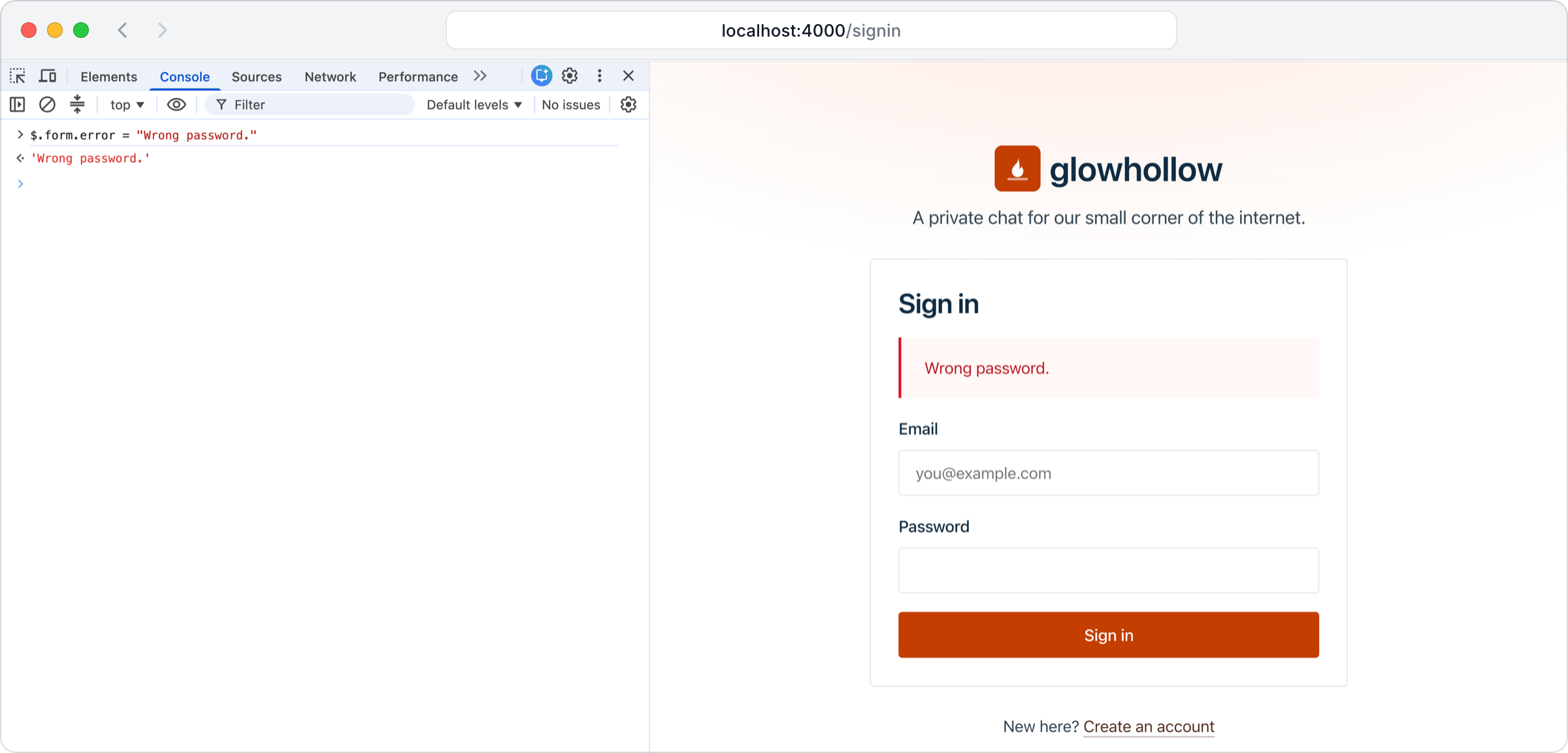
Reactive UI from the browser console
Building a page means seeing it in every state it can be in: empty, full,
loading, an error, a hundred rows. In Elements you see each one immediately. In
the browser's developer console, $ is the page's template attributes. Set any
of them and the page updates automatically, because the UI is reactive. There
is no reload, no code change and no clicking through the app to reach that
state.
Browser console$.form.error = "Wrong password."
Set a template attribute in the console, and the reactive UI updates:
Rendered on the server, live in the browser
The first response is the complete page, rendered on the server, so visitors and search engines see everything at once, with nothing to wait for. Then the browser picks the page up and makes it reactive, from the same template, with no second version of the page to write. A route can send live data with the page, such as a LiveTable view or a channel, and the browser keeps receiving its updates after it loads.
Data from the route and from the server
A route gathers a page's data when it loads. An @rpc function gets more
whenever the page needs it, such as when a form is sent, and you call it from a
template like any other function. Both run on the server, both read the signed
in user from session, and both are type checked at build time, so the data a template
receives is the data the server sent.
Route functions live next to their pages, wired up in the router
Each page's route function lives in the page's own folder, beside its template,
like app/pages/channel/index.ts above. Your app imports them and says which
URL each one answers, so a URL goes exactly where you say, not wherever a folder
happens to sit:
index.tsimport home from "#app/pages/home";
import channel from "#app/pages/channel";
import admin from "#app/pages/admin";

app.route("/", home);
app.route("/c/:id", channel);
app.route("/admin/*", admin);
A larger part of your app, like admin here, can be a router with its own
routes, mounted at a prefix. Patterns follow the web standard URLPattern,
with named segments, wildcards and inline patterns like :id(\d+). The same
routes serve pages and API responses: return a template and it renders, return
an object and it is sent as JSON. Send someone elsewhere with redirect(url),
which works the same in a route, a template and an @rpc function.
Caching that does the right thing
Every page is cached the right way by default, using the HTTP standard:
- Every page carries an ETag made from its source, its data and the session, so
a page that has not changed answers
304 Not Modifiedand the browser keeps what it has. - Every script, stylesheet and image has a hash in its file name, so browsers and any CDN in between cache it until it changes.
- Pages for a signed-in user stay private.
There is nothing to configure and no cache to clear by hand.
Styled from the first line
Every app comes with a design system. A bare <button>, <input> or <table>
already looks finished, in light and dark mode. Classes such as
class="button is-primary" vary it, and your own CSS is for layout.
Change a page and watch the browser update
Open app/pages/home/template.ehtml in a new app, change the heading, and save.
The browser you already have open updates on its own.
One line changed in the template, and the page updates in place:
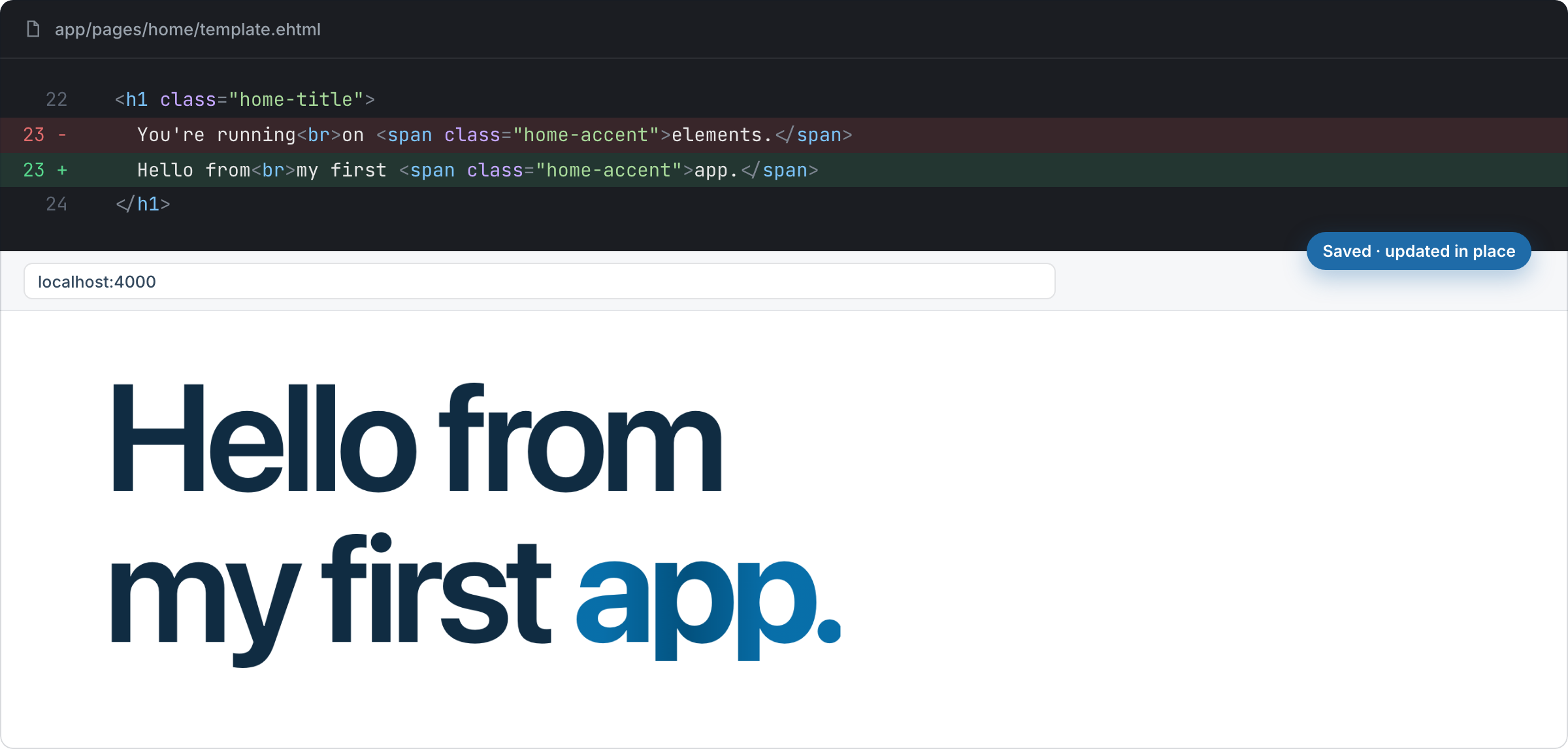
A save often builds and reaches the browser in a few milliseconds, whether you made the change or your agent did.
See pages in a demo
- Glowhollow (opens in a new tab), community chat: live channels, reactions and unread counts from templates like the one above.
- Shortwick (opens in a new tab), a URL shortener: redirects, analytics and QR codes from plain routes.
- Awaywell (opens in a new tab), time off tracking that serves calendar feeds your phone subscribes to.
The manual: html (opens in a new tab), router (opens in a new tab), rpc (opens in a new tab), session (opens in a new tab), livetable (opens in a new tab), channel (opens in a new tab), assets (opens in a new tab), style (opens in a new tab).