Tests in Elements are part of the build. Save a file and the tests your change touched run in milliseconds, and a failing test turns the build red, like a type error. A release does not go out until every test passes. Tests this fast get run, and tests that get run keep your app working.
Tests keep your app working across agent sessions
An AI agent starts each session without remembering what the last one built. Ask for a waitlist today and a refund flow next week, and nothing stops the second change from quietly breaking the first, except tests. Each test records how one part of your app must behave. When a later change breaks that behavior, the build goes red at that save, the agent sees which test failed and why, and it fixes the break before it says it is done.
That only works if the tests are part of the build and fast enough to run on every save. A suite an agent has to remember to run, or has to wait minutes for, is a suite that gets skipped. So Elements made tests part of the build and made them fast.
A test file
app/pages/signup/test.tsimport { test, equal, assert, sql, ValidationError } from "@elements/app";
import { createUser } from "./services";

test("createUser", () => {
  test("saves the user", () => {
    let user = createUser({
      name: "Ada",
      email: "ada@example.com",
    });

    equal(user.name, "Ada");

    let count = sql<{ n: number }>(`select count(*)::int as n from users`).firstOrThrow();
    equal(count.n, 1);
  });

  test("rejects an email without an @", () => {
    let threw = false;

    try {
      createUser({
        name: "Ada",
        email: "not an email",
      });
    } catch (err) {
      threw = true;
      assert(err instanceof ValidationError, `got ${err}`);
    }

    assert(threw, "expected a ValidationError");
  });
});
That is a complete file, named test.ts or <name>.test.ts, anywhere in your
app. There is no runner to configure and no setup or teardown to write.
test() and assertions
test(name, fn) declares a test: a named block of code. Assertions go inside
it and check one thing each. A test passes when every assertion in it passes,
and fails if at least one fails. All of these come from @elements/app:
test(name, fn)declares a test. Call it inside another test to nest it.equal(actual, expected, message?)checks that two values are deeply equal, and shows both when they are not.assert(condition, message?)checks that a condition is true.errorf(format, ...values)fails the test with your own message. Each%vin the format is replaced by the next value.fatalf(format, ...values)fails the test with your own message and stops it on that line.
A failed equal, assert or errorf records the failure and the test keeps
going, so one run reports every problem in it. Use fatalf when the rest of
the test cannot run, such as when a row it needs is missing. An error your code
throws and the test does not catch also fails the test and stops it.
Nested tests
A test inside another test is a child of it. Nesting groups related tests under
one name, like createUser above with one child per behavior, and the results
show the same tree. Children run one after another, in the order you wrote
them.
Every test cleans up after itself
Each test runs inside a Postgres transaction that rolls back when it ends, so tests use real SQL against a real database and never leave data behind. A nested test gets its own savepoint inside its parent, so siblings never see each other's rows. Tests run against your app's test database, never the one you are looking at in the browser.
RPC functions and session in tests
A test calls your RPC functions directly, like any other function, the way
createUser is called above. Tests run on the server, so the call goes
straight to the function with no network in between, and everything it does,
from its queries to its authorization checks, runs exactly as it does for a
real visitor.
session works in tests too. Each test starts with an empty session, signed
out. Call session.login() to sign a user in, and every RPC function the test
calls after that sees that user, the same as in the app. That makes the rules
about who may do what easy to test:
app/pages/admin/test.tsimport { test, assert, session, sql, ForbiddenError } from "@elements/app";
import { deleteChannel } from "./services";

test("deleteChannel refuses a member who is not an admin", () => {
  let member = sql<User>(`
    insert into users (
      name,
      role
    ) values (
      'Bo',
      'member'
    )
    returning *
  `).firstOrThrow();

  session.login({ userId: member.id });

  let threw = false;

  try {
    deleteChannel("general");
  } catch (err) {
    threw = true;
    assert(err instanceof ForbiddenError, `got ${err}`);
  }

  assert(threw, "expected a ForbiddenError");
});
The next test starts signed out again, with nothing to log out or tear down.
Custom failures with errorf
equal and assert cover most checks. Use errorf when the condition you
care about is not a single comparison, and say what went wrong in your own
words:
app/pages/signup/test.tstest("every user has a lowercase email", () => {
  let users = sql<User>(`select * from users`).all();

  for (let user of users) {
    if (user.email !== user.email.toLowerCase()) {
      errorf("user %v has a mixed-case email: %v", user.id, user.email);
    }
  }
});
It is also the quickest way to see a value while you work. Drop in
errorf("total is %v", total), save, and the value shows up as a build error
on that line. Delete it once you have what you need.
See the results
Terminalelements test
Every test in the app, from the build:
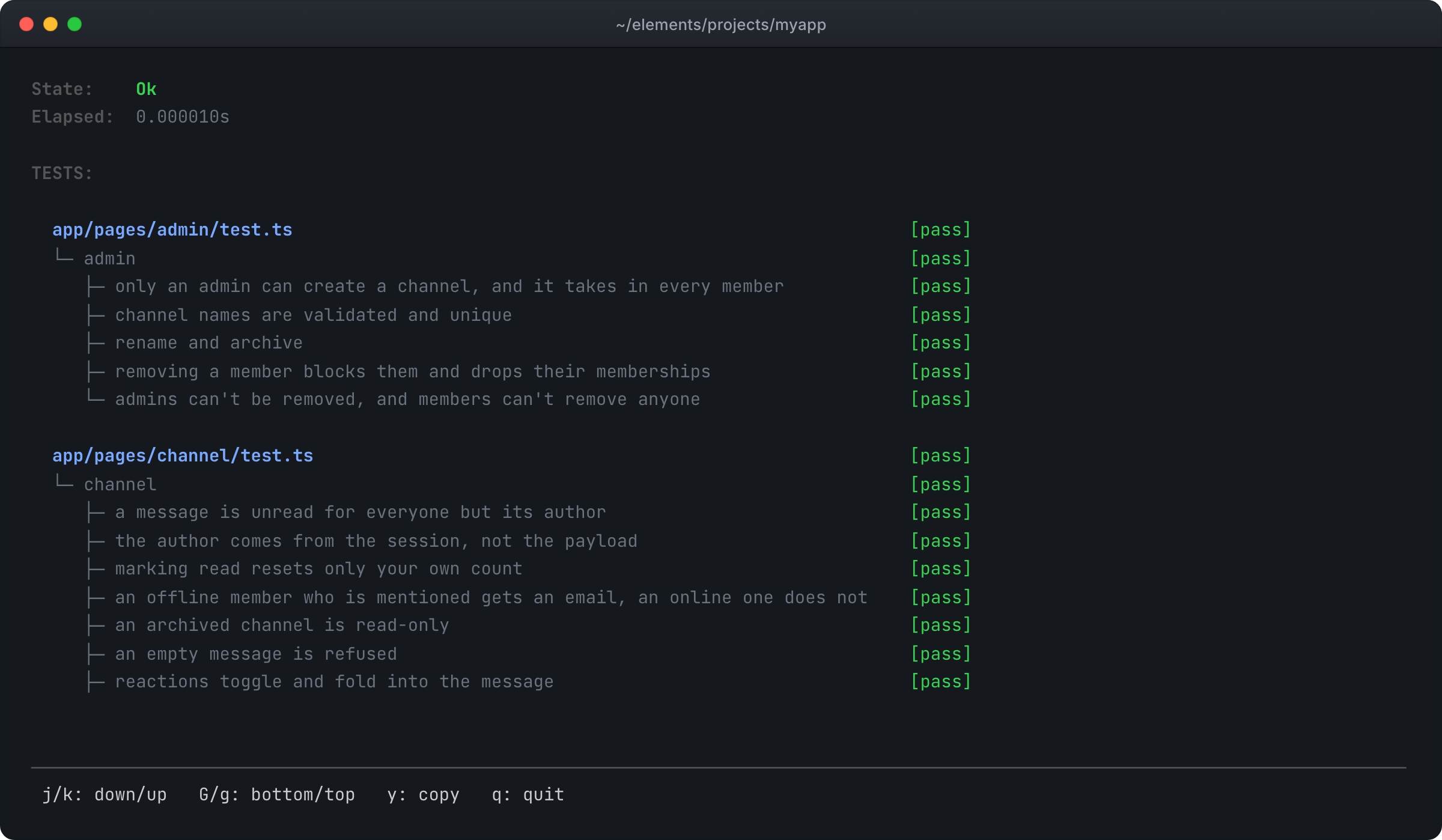
The tree shows every test, passed or failed. An assertion that fails does not
get a line of its own in the tree: it appears like any other build error, with
its file, its line and its message, in the terminal, in your editor and in
elements build -json for your agent. Pass a file to see only its tests, as
in elements test app/pages/signup/test.ts.
Why tests are this fast
- Only the tests your change touched run. A test whose code did not change reports its last result.
- Tests run at the same time. The project server keeps a pool of test runners, one per CPU, and spreads test files across them.
- Test code is hot reloaded, like app code. A save swaps the changed code into runners that are already running, instead of starting new ones.
- Isolation is a transaction. There is no database to reset and no setup between tests.
- A crash does not stop the run. If a test runner crashes, the project server starts a new one and the other tests carry on.
Ask your agent for tests
Ask for tests with the feature, and say which behavior matters:
Agent ChatAdd a waitlist to the class signup page, with tests for a full class and a
cancellation that frees a spot.
Every demo was built this way. Keystoop (opens in a new tab), a real estate listings site, was built with 68 passing tests.
The manual: tests (opens in a new tab), build (opens in a new tab), cli (opens in a new tab).